This page is a collection of Nikon D90 tips, techniques, camera settings and hacks.
Examples of recovering blown highlights in Nikon D90 RAW / NEF files
goldbean posts some screen captures demonstrating how one can recover areas of blown highlights in photos using Capture NX 2 or ACR (Adobe Camera RAW — found in Adobe Photoshop and Adobe Lightroom products).
Free video / movie editing software
If you’re looking for free alternatives to the footage editor that came with your operating system (for instance, iMovie on the Mac) to edit your D90 clips with, or simply wish to add another tool with another set of capabilities to enhance your creativity, consider giving ZS4 or Avidemux a try,
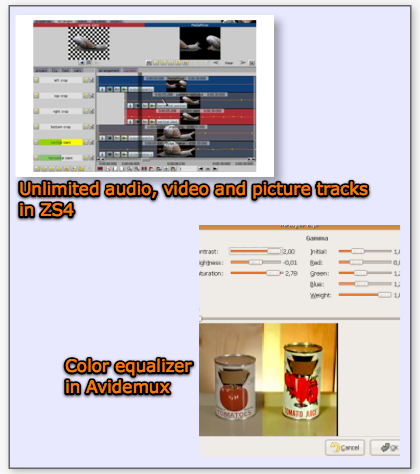
The ZS4 has features such as “Unlimited number of audio, video and picture tracks“, while Avidemux has a color equalizer.
Both software run on Windows, Mac OS X and Linux.
Credit: iLife’s Free Alternative !
D90 Guide by Ken Rockwell (added: 26-Jan-09)
Read Ken’s guide, which is written in an easy-to-understand manner, and will help you with some helpful advice on the more useful aspects of the D90’s functionality. For instance, Ken has this to say on Auto ISO:
Auto ISO leaves the ISO alone until the shutter speed would get slower then the Minimum shutter speed set below. If the light (or your camera settings) would cause a slower speed, Auto ISO increases the ISO so the shutter speed remains at the slowest setting below.
Nikon D90 Settings for Outdoor Photography
Thom Hogan recommends setting the Picture Control to Neutral, Sharp +5 and Contrast -1 as a starting point to getting better photos than with the default Standard Picture Control.
Nikon D90 Manual
Download the Nikon D90 operation guide to gain a more thorough understanding on the features and usage of the camera. Many camera owners also prefer to refer to the PDF version and not use the actual printed manual that comes in the box so that it remains looking new.
Nikon D90 Digitutor
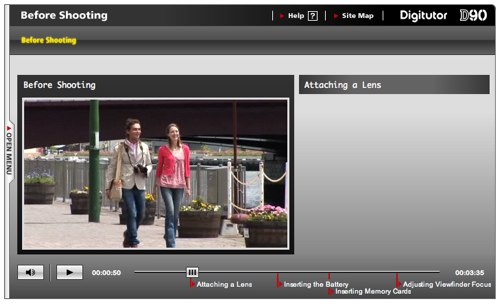
This is the official online tutorial site for the Nikon D90. The instruction is mainly video-based, using Flash technology.
Display the ISO value in the Viewfinder
The frame counter display in the viewfinder can be changed to display the current ISO value instead. Just go into the menu, navigate to Custom Setting d3:ISO Display and Adjustment and change the default “Show frame count” option value to “Show ISO sensitivity (ISO). Refer to page 181 of the user manual for details.
The D90 works as a PTP device only
For some strange reason, the D90 cannot be setup as a USB mass-storage device and won’t appear a USB drive on your computer, unlike the other Nikon Digital SLR cameras. Mark Bessey says:
As it turns out, the D90 does not show up as a USB mass-storage device, so you won’t see it as a drive that you can copy files directly to/from. It does show up as a PTP (picture transfer protocol) device. That means that most software that’s designed to download digital images from a camera will work just fine with it.On my Windows PC at work, the “Scanner and Camera Wizard” appears, just like it does for any other camera, and the import process looks and acts just the same. On the Mac I have at home, iPhoto and Adobe Bridge and Transfer NX are all able to transfer photos off the camera just fine.
So, if you’re used to using the file browser tools on your OS to transfer individual files off of your camera, you might find this a limitation. On the other hand, if you’re batch-transferring hundreds of files at a time, the software you already use will work just fine.
I don’t know whether PTP is generally slower than copying files from a camera that appears as a mass-storage device, but of course, if you care about speed, you’d be using a dedicated card reader, anyway. Actually, I just did a quick comparison, and for 129 pictures downloading from a SanDisk Extreme II SD card, I didn’t see any difference between the download times using PTP from the D90. versus using the card reader.
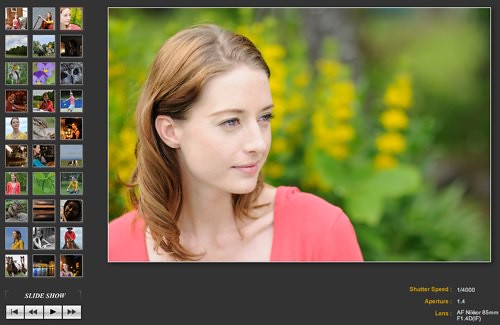
Be sure to check out the photo gallery that’s part of the DigiTutor series — it gives you a pretty good idea of the kind of shots you can get with various lenses. You might want to hit the pause button to stop the slideshow.
Turn on AE lock (hold)
This is a personal preference of mine, but you might like to set Custom Function f4, Assign AE-L/AF-L button, to AE lock (hold). This way, when you want to lock the exposure on the D90 (which is especially useful when you don’t want the exposure to jump all over the place while shooting movies with the D90), all you have to do is press the button once, and you can let go of it — the exposure remains locked. To have the camera re-meter an exposure, simply press the button again.
D90Hack Program
This program allows Nikon D90 RAW / NEF files to be opened by older software. It works only on Microsoft Windows platforms. Although the program allows you to open the files, incorrect colors may result due to a change in the Bayer Color Filter Array (CFA) — view a related discussion on Nikonians.org about this software.
RAW Photo Processor (RPP)
An alternative program to Nikon Capture NX for conversion of Nikon D90 RAW / NEF files. The program only works on Mac OS X 10.4 or later. It does not have the advanced editing features and tools found in programs such as Nikon Capture NX 2 or Adobe Photoshop Camera RAW, but is meant to be used to obtain the best RAW conversion possible in the initial stages.
Nikon Capture NX 2
I have personally found that the best all-round converter and editor for Nikon RAW / NEF files is Nikon Capture NX 2. Release 2.1.0 was announced on September 17th, 2008 and is the first release to support the D90. For a test run, download the 60-day trial version. See an example of how chroma-only noise reduction can be performed within Capture NX 2.
Your tips?
If you have any Nikon D90 tips, tricks, techniques of camera settings to share, please don’t hesitate to write me, and I’ll post up your contribution with a link back to your site or gallery.
Related
Nikon D90 — Main page