Review of the Phottix N8 (previously known as N1) Wireless Remote Control Set and my Nikon D300
Latest update: A new, updated remote, the Phottix Cleon is now available. Read my review of the Phottix Cleon N8.
Just like the Phottix Wireless Remote Set N8 (previously known as Phottix N1), the new Cleon is compatible with all Nikon cameras such as the D3X, D700, D3, D2X / D2Xs, D300, D200, D80 and D70s.
Get the Phottix Wireless Remote Set N8 on eBay instead of the Cleon if you prefer the lower cost unit and don't require the more advanced features on the Cleon.
After examining various options for remotely controlling my Nikon D300, I finally decided to buy the Phottix N8 wireless remote control set off eBay.
It's hard to argue with having to only pay $37.00 USD (shipped, and the remote is cheaper for other makes of cameras – see the Where To Buy section towards the end of this article) for the Phottix Wireless Remote Set N8 which is available on eBay (interestingly, the $59.95 Opteka Wireless Radio Remote Release for Nikon D700, D3X, D3, D300, D200, D100, & D2x SLR Digital Cameras sold at Amazon looks exactly like the much cheaper version I bought), which I purchased from etefore, an extremely reliable merchant. Positive reviews on the product and the merchant from satisfied owners at DPReview.com helped a lot too.
I had four requirements for a remote trigger:
- Must be easy to take BULB exposure with.
- Must be light and small.
- Must be able to operate in wireless mode, so that I could, for instance, include myself in a group portrait and trigger the D300's shutter from where I stand.
- Must be low-priced.
The Phottix Wireless Remote Set N8 fulfills all four requirements nicely.
Exactly a week after placing the order with the eBay merchant, I received the set in the mailbox. Here is what you get in the package:
Phottix Wireless Remote Control – Set of Transmitter and Receiver

That's the receiver on the left, and the transmitter on the right. This unit works with any of the mid to higher range Nikon digital SLRs, including the D200, D2 and D3 series.
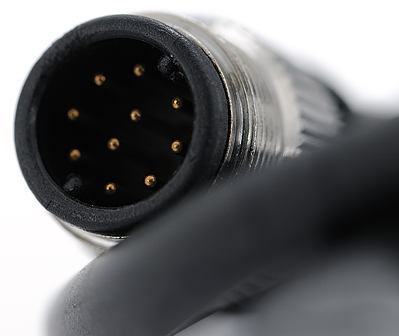
The receiver has a connector that must go into the 10-pin remote terminal on the Nikon D300, like so:
This is how the connector on the Phottix receiver looks like
Open the cover of the 10-pin remote terminal on the Nikon D300

Insert the receiver's connector into the D300's remote terminal

The connector cable does not interfere with the operation of the lens release button

For a device that's so cheap, it's a pleasant surprise that a locking collar is available on the receiver's connector. Screw this collar tightly in order to ensure a secure fit with the D300's remote terminal. For now, I don't use the locking collar – there's no need to as the receiver is very light, and once connected, the fit is secure enough that there is no fear of the receiver falling off. I save a bit of effort this way.
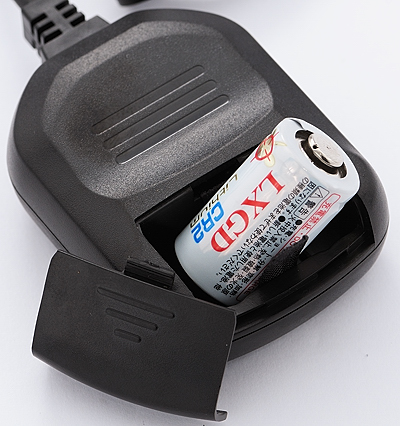
A CR2 lithium battery is required to operate the receiver, and is included in the package. Installation of the battery is easy enough, with a sliding cover for the battery compartment.
The transmitter has an antenna that can be extended. Communication with the receiver is via radio frequency, and the claimed operating range is 100 meters.

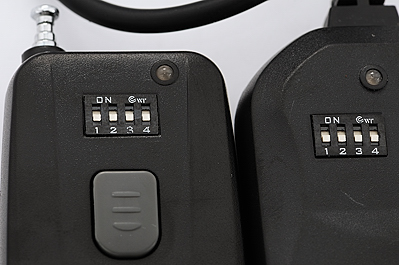
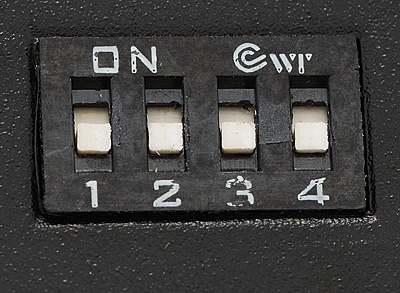
16 channels of communication is available, and you set it via 1 of two positions available for 4 switches labeled 1, 2, 3 and 4. The switches need to be set identically on both the receiver and the transmitter. The units arrived with all the switches already in the "Down" position as shown in the photo below – I did not have to change anything.

By the way, the build quality is good enough for me. If you have a macro lens and take a close-up of the lettering though, you might be less than pleased with the quality of the paint job
. In my opinion, this in no way detracts from the functionality of the unit as the lettering is used only to label the channel selector switches. It's easy enough to identify which switch is which without having to rely on the labels.
How to operate the Phottix remote control
In order for the remote control to work, the receiver must first be switched on by pressing the only button found on the unit. Once this is done, the red LED on the right lights up.

Half-pressing the button on the transmitter simulates a half-button press on the Nikon D300's shutter release button. In this instance, the left LED lights up and turns green.

Pressing down all the way on the transmitter's button takes the photo. The left LED on the receiver turns red for an instant. If you're shooting in BULB mode, the left LED continues to glow red until the exposure is terminated.

Demonstration: Using the Phottix remote control to operate the Live View on the Nikon D300 and take a long-exposure photo in Bulb mode
The button on the transmitter simulates the shutter release button on the Nikon D300. There are three positions:
- Unpressed (no battery power is consumed in this instance)
- Half-pressed, LED on the transmitter turns green: Depending on how your D300 is set up, this activates Auto Focus (AF). In handheld Live View mode, this flips the mirror back down for AF to take place)
- Fully-pressed, LED on the transmitter turns red: In normal exposure modes, this takes the picture. In BULB mode (or B mode), you must hold the button at this position for another 3 seconds until the red light on the transmitter goes out. Once the required time interval has passed, you just need a half-press on the transmitter's button to bring the camera out of BULB exposure.
I have made a video clip showing how I used the Phottix remote control to operate the Nikon D300 in Handheld Live View mode, and also how I took a long-exposure photo with the D300 in bulb mode.
First, Live View was activated:
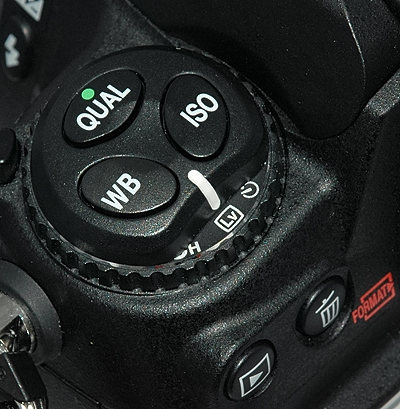
Then, I put the D300 into BULB mode:

Here's the video clip (view a larger version) that explains how everything was done:
Sample Photos
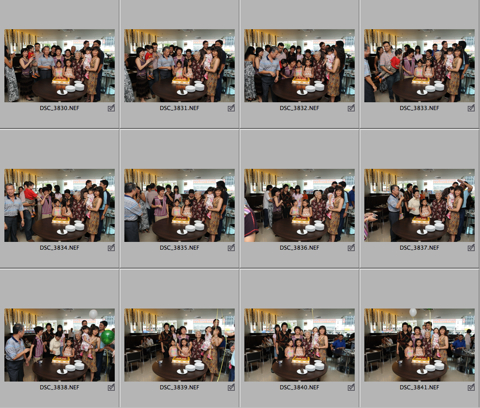
I've taken quite a number of photos with the Phottix remote control, but I think this set of pictures shot at my Mother's 61st birthday celebration shows just how convenient the remote control can be. I managed to include myself in the photos by first setting the D300 on a tripod and pre-focusing on the scene. I then mingled with the crowd and let them do whatever they wished, clowning around and posing occasionally. With the remote in my hand, I randomly took the photos by pressing the button every time I wanted a picture. For a larger version of the shots, please go here, but bear in mind that they had been converted from the NEF files at the "Good Balance" quality setting in Nikon View NX.

Using the Phottix remote at this event made me realize one strong advantage it has over using the InfraRed ML-L3 remote to control the Nikon D70 in remote mode. On the D70, every time the exposure meter times out and goes to sleep, the D70 would exit from the remote mode and you can't use the ML-L3 to trigger the D70 anymore. I would have to walk over to the D70 and manually press a button and turn the dial to put the camera into remote mode again. This weakness on the D70 means you can't take your own sweet time and trigger the camera as and when you like.
Despite the Phottix remote system being bulkier than the ML-L3, I now have a very strong preference for the way the remote control system as a whole is implemented on the D300. As long as you have the receiver plugged into the 10-pin terminal, you're good to go and can trigger the D300 anytime you want – there's no such thing as a timeout. Furthermore, connecting the receiver does not in any way interfere with the normal shutter button operations on the camera – you can continue using the camera's shutter button normally.
Conclusion
I highly recommend this product for those who wish for an alternative to the Nikon-made remote controls. For a price that's almost a steal, you get a fully functional unit that I daresay works much better than Nikon's own (more expensive) products, such as the MC-30, which is a cable trigger, or the ML-3, which works with InfraRed (a hugely expensive device that does not have a locking feature for BULB photography, but has a trick function that allows the shutter to be triggered when a subject moves between the transmitter and the receiver).
Where To Buy
Search for the Phottix Wireless Remote Set N8 on eBay.
The Phottix Wireless Remote Set N8 remote is also available for other camera models. The only difference is in the connector type:
- Phottix Wireless Remote Set N6 (previously known as N2) on eBay, for Nikon D80, D70s
- Phottix Wireless Remote Set C6 (previously known as C1) for Canon 350D / XT, 400D / XTi and 450D / XSi
- Phottix Wireless Remote Set C8 (previously known as C3) for Canon 50D, 5D Mark II, 1Ds Mark III, 20D, 30D, 40D, 1D Mark III, 1Ds series and 1D series
Nice To Have
About the only wish I have for all remotes, be they of the Phottix brand or Nikon, is: Make It Smaller!
Much smaller, something like the size of the Nikon ML-L3 infrared remote control that's made for the Nikon D40/s, D50, D70/s, and D80. In my opinion, that's the best size to have for a wireless remote.
Below are some size comparisons:
Phottix remote vs Nikon ML-L3, top view
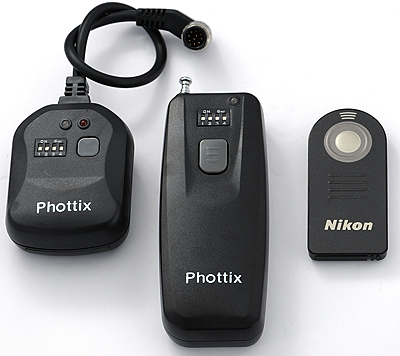
Phottix remote vs Nikon ML-L3, bottom view

Just for the record, the Nikon ML-L3 needs line of sight from the remote to the sensor on the front of the Nikon digital SLR mentioned above, and can only simulate a full-button press on the shutter release. The Phottix uses radio frequency for communications, which means you can position yourself comfortably anywhere relative to the camera, as long as you're within a 100m radius (the caveat is that there must be no obstacles for this maximum range to be achieved).
Warning
The use of RF (radio frequency) devices is heavily regulated in certain parts of the world, where only certain frequencies are allowed or require a permit while others are forbidden outright. Read TOF Guy's post on why there is a high likelihood that the Phottix remote cannot be used in France.
December 13th, 2007 at 3:52 am
Thanks for the review. I think you've sold me on the N1, since my ML-L3 doesn't work on the D300. You mention using it for group portraits – do you use the N1 with the Self-timer delay on the D300?
December 14th, 2007 at 6:18 pm
Hi Thomas, I actually haven't tried including myself in a group portrait yet. Deciding which mode to use the remote with is probably a just a matter of preference. Having said that, yeah, the first thing I'd try would be to use the N1 to start the timer countdown.
19-Jan-2008 update: Thomas, I've included myself in a few group shots and found out that leaving the camera in the normal 'S' mode was enough to do the trick. I keep the remote hidden in the palm of my hand and just fire of multiple shots by pressing the button a couple of times. See these sample photos for an example.
December 22nd, 2007 at 2:10 pm
Thank you for your thorough review & pretty photos.
December 23rd, 2007 at 3:01 am
I think its just silly Why does nikon just built in the unit inside the camera really how much space would the divice take ? mabe it will be in the next model
December 27th, 2007 at 2:27 pm
Nice review! I just bought a Phottix N1 for my Nikon D200 and have only had time to do some basic tests, but it seems to work fine both inside with flash and outside in daylight up to at least 50 yards (which is all the room I had to do a quick series of test shots). It seems to work fine and in my opinion is much better than the Nikon ML-3 infrared remote which I used with an earlier model Nikon (D70). The IR remote was a bit fussy about line of sight to the tiny sensor and also seem to be questionable beyond about 15 feet. Sometimes it fired, sometimes not. So far the Phottix has fired on every shot.
Have you tried looking a battery changing in the transmitter? It says on the box (only instructions) to open the back of the transmitter to change the 23A 12-volt alkaline battery in the transmitter?
It looks like this involves removing the two tiny Phillips head screws at top and bottom of the transmitter. Not too difficult but it looks a bit scary not knowing what's inside or how things are secured. I decided not to open it until necessary or learning more from someone else. Both this battery and the receiver CR2 3-volt lithium battery seem to be used in a lot of garage door remotes so should be easy to find and are not expensive.
Thanks again and please let me know if you have looked inside yet.
December 28th, 2007 at 8:57 am
Follow up to yesterday's question about changing transmitter battery: on another Nikon discussion forum today I got a reply from a user who had opened the transmitter by removing the two small screws at the top and bottom of the transmitter back cover.
He said it was an easy operation and that there is a standard battery holder inside similar to those you see for AA or AAA batteries, with metal clips and a spring. Nothing fell apart upon opening.
So I will feel more comfortable about replacing the 23A battery when it dies.
Thought all would like to know this.
December 30th, 2007 at 1:10 am
The written review was extremely impressive.
It was clear, to the point, covered the bases, and easy to read.
What lens did you use to shoot the close-up lettering?
January 1st, 2008 at 9:06 am
Does it work with the self timer mode of camera like canon 20d ?
I dont want remote to be visible in the shot, a shot using a timer can solve this can you please tell us that,,,:) thanks.
January 1st, 2008 at 10:29 am
@Ahmed – yes, it works with the self timer mode … at least it does on my D300. It really just acts like a remote shutter release button – whatever modes the actual shutter button on the D300 can be used with, the Phottix can too.
January 13th, 2008 at 11:56 am
Just ordered one from ebay $30 with shipping. I have had my D300 for about a month now and feel I could use one when I get my 50-400. The zoom lens I have is also equipped with VR and is a Nikon 18-200 and only when I use the 2x teleconverter do I feel I need a remote to take the shot.
January 18th, 2008 at 4:17 pm
Hello,
I received it yesterday, first try was ok with my D300.
This morning I reconnect it, remote control signal is well received on the receptor, but no action on the camera ( no AF, no shoot).
I 've controled the connection witn camera, and connection is good and screewed.
What's your opinion ?
January 18th, 2008 at 7:06 pm
Lampion,
From the same camera position, are you able to AF and take a photo using the camera's shutter button? Even with the receiver connected, normal shutter button operations should continue to be available.
Please give us an update on your further tests.
I continue to get excellent performance with my copy of the Phottix N1 remote control – good luck to you!
January 21st, 2008 at 6:55 am
Excellent review. You've covered all the bases. I use a Phottix on my (cough, cough) Canon, as well as the Phottix High Capacity Battery Grip. Both are solid pieces of gear.
January 21st, 2008 at 9:59 pm
I've been looking for a replacement for my ML-L3 now that I've upgraded from a Nikon D50 to a D300. These devices are actually quite a lot cheaper than I thought. Thanks for the thorough review!
January 24th, 2008 at 8:36 am
it seems i'm having the same problem as lampion with my d300. and yes, i am able to af and take a picture using the camera's shutter button while the receiver is attached. the receiver and transmitter both seem to be working together (the receiver light blinks when the transmitter is activated)it just doesn't af or take a picture. camera is on program mode, and single shoot mode
January 27th, 2008 at 12:04 pm
I bought the Phottix wireless remote approximately 3 months ago. Has worked like a charm until recently. Everything seems to function perfectly EXCEPT the shutter release. Half press will still autofocus but full press simply will not work anymore. The camera (D200) is not reporting any errors. Batteries have been changed in both units and different frequencies have been tested.
January 27th, 2008 at 11:27 pm
Hi all,
Received a second email confirming that the Phottix was shipped last week. I shall let you know how it turns out after I had a chance to test it. I live in Florida USA, so it might take a while for it to arrive… If I encounter the same problems as some users claim they have eg half pressing is working etc. but no shutter release?! I shall attempt to find out which component(s) in the transmitter/receiver has failed…
January 28th, 2008 at 3:26 pm
@CMB – I wish you all the best with the remote – do keep us posted!
February 1st, 2008 at 12:14 am
I too wary about the Phottix unit until mine turned up from HK recently. What can I say: it just works and for that price, if it stops in a year I shall still consider it good value for money. I especially like the half-press AF capability too.
February 5th, 2008 at 8:37 am
today I received the Phottix remote that we ordered. After I had read the included letter and the information on the box. I proceeded to try it out.
Everything worked wonderfully, as advertised in a Review at http://www.dpnotes.com/phottix-cleon/). And yes I did read the news shortly after I ordered the Phottix N1 and was very pleased indeed to find that I've received the upgraded Phottix-Cleon. It is a great product besides there is nothing out there that can touch it…
Thank you for the nice reviews…
February 14th, 2008 at 7:06 pm
I bough 2 Cleons Remotes, 1 had a bad Battery, I replaced the Bat…. and it worked just fine.
March 4th, 2008 at 7:29 am
HI just recieved mine today it doesnt seem to function in bulb mode when i turn it to b on the reciever the shutter opens i can push the transmitter button nothing happens any ideas
March 4th, 2008 at 7:43 am
Bret, the B position on the Phottix Cleon receiver is meant to only be used in wired mode, that is, without having to use the transmitter. If you wish to use the transmitter, then you slide the receiver switch to the On position, not B. With the camera in BULB mode, press and hold down the transmitter button for 3 seconds – this opens the shutter and keeps it open. To terminate the BULB exposure, half press the transmitter button and then let go. Read the BULB Exposures section of my Phottix Cleon review for the details.
April 14th, 2008 at 7:55 pm
Just received the N1 today and I must say i was a bit sceptical at something so cheap. It seems to work an absolute treat and at that price £9.99 plus postage a bargain.
Nice review by the way.
May 25th, 2008 at 4:52 pm
Hi, will the remote work as just a standard wired cable release. Ie if the battery goes flat will the cable release mode operate. thanks
May 25th, 2008 at 6:34 pm
@Victor – yes, the remote will work in wired mode even if the battery goes completely flat.
June 17th, 2008 at 11:54 am
[...] what you need, and how to use it. Oh, and why not use one of the cheap 3rd party remotes (e.g. Phottix N1 or Cleon N8), a real remote like a ML-3 or a MC-DC1 Remote cord? Well if I can DIY I'd [...]
June 21st, 2008 at 11:13 pm
[...] for my Nikon D200 on ebay that is one third the price of Nikon's wired version. Here is a review of the remote.The Phottix remote can be used wired or wireless, and is very useful for photos of [...]
July 31st, 2008 at 7:26 am
Does this remote release screw into My Nikon D300 or does it slip in? I just wanted to be sure of how well it stays on the camera itself.
July 31st, 2008 at 8:56 am
@Jeff Thurman – you can do it either way – plug it right in, or plug it in and then screw it tight.
I normally just insert it in without screwing the collar as the fit quite snug.
November 13th, 2008 at 8:12 am
I just ordered the Phottix Cleon for my Nikon D300. I just hope it doesn't bother the camera's circuitry. Here's hoping!
Bill
September 1st, 2009 at 4:19 am
Has anyone tried the Phottix Plato vs the Cleon II? I'm trying to decide between the two but haven't been able to find any user comparisons.
Thanks,
Marc
September 1st, 2009 at 6:57 am
Marc, I didn't have the time to do full reviews, but have posted up videos of the Plato and Cleon II.
The main differences are that the Plato has a stronger and more reliable radio signal on the transmitter.
And, if you just want to use the receiver as a wired remote, the Plato requires a battery, while the Cleon II receiver (just like the N8) does not need a one.
September 1st, 2009 at 10:04 am
David,
Thanks, I appreciate your getting back to me so quick. Do you have any thoughts on the Plato's 2.4 GHz vs. the Cleon II 4xx MHz? I realize the 2.4 MHz is supposed to be better but do you think it really matters? Also, from a quality perspective, when you did your videos did you see a significant quality difference?
Thanks for the help, I really got a lot out of your videos.
Marc
September 4th, 2009 at 11:55 pm
Marc, the Cleon II is more than sufficient for normal photography, say when you want to include yourself in group photos.
However, I'd recommend getting the Plato if you intend to *** reliably *** trigger the camera outdoors from a distance exceeding 10 meters / 30 feet.
October 26th, 2009 at 6:24 pm
I purchased the Phottix a year ago for my Canon D40 and it works superbly for wildlife shots up to 300 feet. Using my tripod set up, I can hide. On macro shots it cuts down on that tiny bit of camera shake if I were pushing the shutter. BUT I have had problems with the receiver staying on. The slightest jar and it turned off; then it was hard to turn on and off because the small button wouldn't respond. My husband cleaned interior connections and it worked for another four months but is unresponsive now. New batteries, etc didn't fix it. At this price though, after a year, I'm ordering another one. It looks, from your review, like they have made some upgrades so hopefully the receiver button connection is one of them.